
The Fannin County Court Calendar
Odyssey Public Access lists Court Calendar as its own location, beside Criminal Case Records and Civil, Family & Probate Case Records. It is the county's main online stop for a Fannin County court calendar. One caution applies. Some final filter fields may not render on the screen, so use only the controls you can actually see rather than assuming date, party, or judge filters exist.
A case chronology can also hold setting events. Compare it against the separate calendar view. Fannin County itself warns that web information is no substitute for the proper department when accuracy is imperative. The court or coordinator, not a saved copy of a page, controls the current setting.
Fannin Odyssey Calendar Choice
The county records page takes you to the Odyssey landing screen. There a three-way location choice matters. Pick Court Calendar for schedules. The criminal and civil locations instead point toward case histories. Those histories live in the Fannin County court docket. A calendar entry only tells you when a matter is set. So it is no stand-in for the filed notice, the signed order, or the final judgment.
The official Odyssey landing lays out that same location choice.
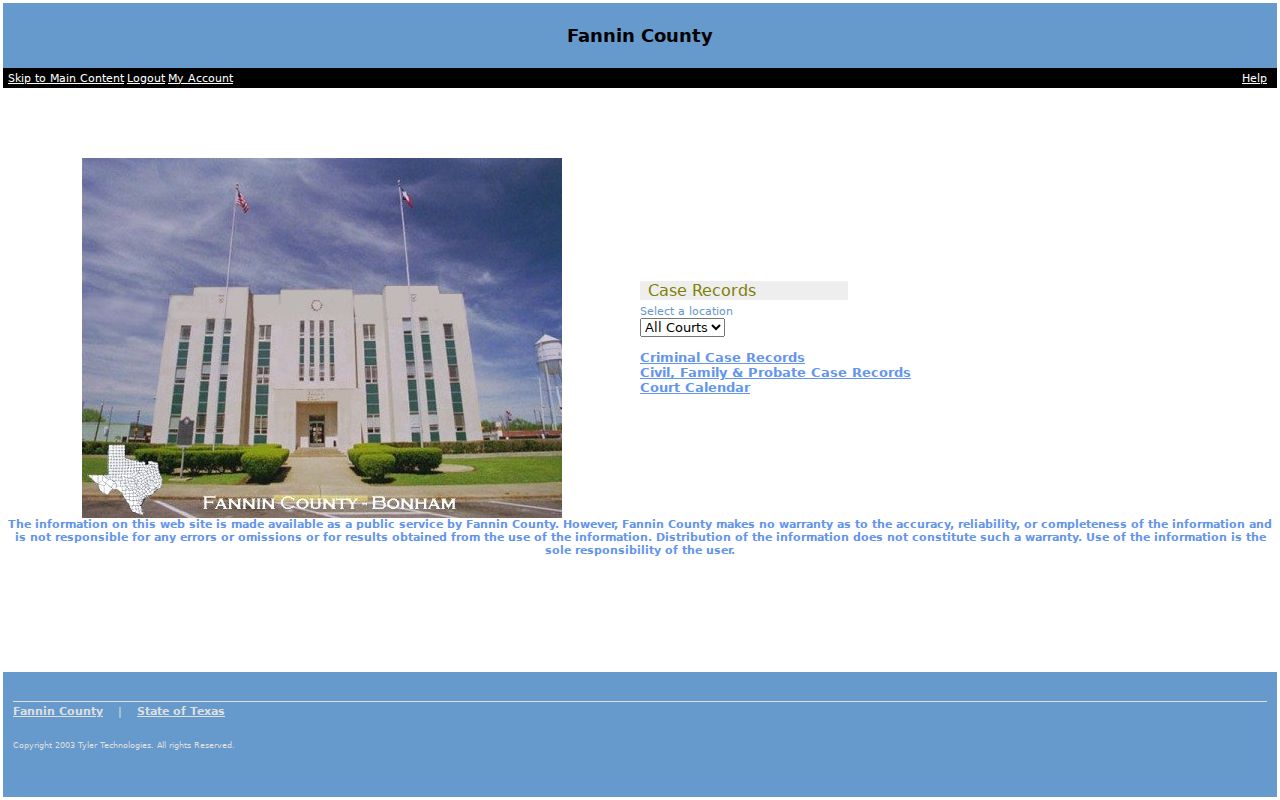
That official page lays out the available record families, and nothing more should be read into it.
How to Find Your Court Date
Begin with the court named on your latest notice, citation, or case record. A cause or citation number helps most. Names alone often return uncertain matches in a docket search. Check both the case setting and the calendar view. Then confirm through the direct channel for that court.
- Open Odyssey and choose Court Calendar.
- Use the narrowest field shown by the live system.
- Compare the setting with the case record and latest notice.
- Call the District Clerk, County Clerk, JP, or municipal court that owns the matter.
- For a 336th setting, confirm with the coordinator before appearing.
Fannin Date Confirmation Channels
For 336th District Court dates, coordinator Brandi Todd is listed at 903-583-2863 and btodd@fanninco.net. The District Clerk, at 903-583-7459 or dcrecords@fanninco.net, handles case records. County Court at Law misdemeanor settings run through the County Clerk. That office keeps those files.
JP and municipal dates take a local call. Fannin County has three separate JP precincts. City citations stay with the issuing city. The county offers no single daily printed calendar and no universal reminder program. Your lawyer may hold the current notice too. But the responsible court remains the authoritative source.
Reading a Court Setting
Read a Fannin County calendar line as linked fields. Date and time mean little without the court or location. The setting type tells you why the matter is scheduled, not what the court will decide. The public view may not show every field. Confirm anything missing with the court.
| Date | The scheduled day, subject to a later reset. |
|---|---|
| Time | The listed call or hearing time, which should be confirmed. |
| Courtroom | The room or court location; it was not exposed on the landing screen. |
| Judge | The presiding court or judicial officer, confirmed through the court. |
| Setting Type | Arraignment, pretrial, hearing, trial, or another stated purpose. |
Fannin Calendar Terms
Calendar terms can look like outcomes when they are really just schedule labels. Fannin County publishes no verified Odyssey code legend. Read the full term on the entry and skip guessing at abbreviations.
- Setting
- A scheduled appearance or hearing.
- Docket call
- A calendar call where cases may be checked for readiness or status.
- Continuance
- A postponement, not a final result.
- Reset
- A move to a new date that must be confirmed.
- Disposition
- A case outcome or recorded status, not a calendar label.
A notice of setting is a filed notice. A calendar entry is the schedule view. A signed order is the court's own document. Each one serves a different purpose in the court record.
Resets, Continuances, and Cancellations
Fannin County has no countywide rule or universal automatic-notice practice for calendar changes. A reset or continuance may show up as a later event. It does not dispose of the case. Keep every notice and compare it with the current online entry.
If a setting vanishes from the docket, do not assume cancellation. Call the clerk or coordinator. Give the court, cause number, old date, and setting type. Then ask for the new date, time, and location. The court's answer and the latest filed notice beat an old calendar copy every time.
Fannin City Calendar Models
Municipal courts do not merge into one Fannin County schedule. Leonard publishes dated monthly docket files. It holds sessions once a month, usually the third Wednesday at 5:00 p.m. Leonard's court tells a citation recipient to make contact within ten days to set a date. That rule is Leonard's alone. So do not carry it to another city.
Bonham works differently. Its citation carries the appearance date. The judge sets a trial date and time only after a not-guilty plea. The Bonham court clerk answers at 903-583-2071. Other cities and JP precincts need their own confirmation. And payment-office hours never establish the hearing calendar.
Leonard's monthly files are a good publication model. But they set no county rule. Bonham posts court and payment information rather than a matching file. Trenton and Ector offer no interactive citation search. Use the city named on the citation and its current clerk contact. Odyssey will not combine municipal dates for you.
Justice-court schedules sit apart as well. Precinct payment pages list office hours, often with a noon closure. But those hours cover payments only. They are not hearing times. Call Precinct 1 at 903-583-7489, Precinct 2 at 903-587-2846, or Precinct 3 at 903-378-0015. Ask each for the setting tied to that precinct's case.
Blank Fannin Calendar Results
A blank screen on the Fannin County calendar means little by itself. Check the case history for a notice of setting or a later reset first. Then confirm which court family owns the case. District settings belong to the District Clerk and the 336th coordinator. County misdemeanors go through the County Clerk. JP and municipal cases stay with the precinct or the issuing city.
When you call, have key details ready. Bring the cause or citation number, the court, the name as recorded, and a date range. Ask whether the setting moved, was canceled, or simply is not cleared for web publication. For a filed notice or order, try the clerk or re:SearchTX where available. A docket that shows nothing does not prove that no setting exists. So verification is always the safer step.
Compare the latest notice against any calendar entry too. The clerk can search records and supply documents. The coordinator can confirm a 336th setting. Those roles overlap only in part. Off-site records may take longer to retrieve, and the county promises no fixed processing period. Write down the date and source of each confirmation you get.
What To Do If You Miss a Setting
Call the responsible Fannin County court right away after a missed setting. Have the cause or citation number on hand. Bring the court, the missed date, and the type of setting. Ask what the docket now shows and what the court wants you to do next. If you have a lawyer, contact counsel promptly. Paying online does not resolve a missed hearing on its own. Leaving a message does not either. Neither does a blank calendar. Keep the latest notice, and note when, how, and with whom you confirmed the new status.
Missed a setting? Consequences depend on the court and case, so do not rely on a generic countywide assumption.
Call the clerk or coordinator immediately and ask for the present status and required next step.
Seek advice from a licensed attorney when legal rights or a warrant may be at stake.